Contributing to kubechecks
We're always looking for community contributions to kubechecks. The best way to get started is to create an issue. This can be for a bug, or for a new feature. This helps us gauge how many other users are impacted, or would benefit from a new feature.
Issues
We use Github Issues to track issues and features for this project.
Contributor Agreement
We have decided to use DCO to reduce the friction of contributing to kubechecks. To sign off on a commit you can use -s or --signoff when committing to append a trailer.
If you forget to sign off on your last commit you can amend it using git commit --amend --signoff, or if there are multiple commits that need to be amended git rebase --signoff HEAD~2 can be used replacing HEAD~2 with the number of commits to go back. More information can be found in this Stack Overflow post.
Other notable projects that use DCO:
Pull Request Process
- You are welcome to submit a draft pull request for commentary or review before it is fully completed. Feel free to provide more information on the issue you're addressing or a link to a specific one to add more context.
- When time permits
kubechecks's core team members will look over your contribution and either merge, or provide comments. It may take some time for us to respond. We kindly ask that you do not target specific team members. We may also reject a PR at this time with comments around why, and if we would reconsider it. - If we have requested changes, you can either make those changes or, if you disagree with the suggested changes, we can discuss it further in the pull request. This may be a multi-step process. It is the contributor's responsibility to address any changes requested. While reviewers are happy to give guidance, it is unsustainable for us to perform the coding work necessary to get a PR into a mergeable state.
- Once all outstanding comments and checklist items have been addressed, your contribution will be merged! The core team takes care of updating the change log as required. It may be a bit before we cut a new release so your changes may not be available immediately.
PR Checks
The following checks run when a PR is opened:
- Developer Certificate of Origin (DCO): This check is applied against every commit. If a single commit is not signed the check will fail. Please checkout our Contributor Agreement for more details.
- Tests / Build: unit tests, go vet and docker build are executed on each PR. These must all pass for a PR to be considered mergeable.
Developer Environment
Tools / Accounts
- Go 1.25
- Ngrok
- Tilt
- Gitlab / Github token
- OpenAI token (Optional)
- Kubernetes
- minikube
- kind
- Docker Desktop
Some of the above tools are not necessary if you're developing against an externally accessible kubernetes cluster. We leverage Ngrok for local testing in order to accept webhooks from Gitlab/Github.
Tilt
Tilt.dev is used to power the local development environment.
The Tiltfile defines all the resources required to build, run and test kubechecks.
It creates:
- Gitlab / Github repository with test files. Using the token's user repo (e.g. github.com/your-username/relative-emu)
- Deploys ArgoCD and some demo applications to your kubernetes cluster.
- Deploys ngrok to provide an external accessible URL for Github/Gitlab to send webhooks to your local dev environment.
- Builds, tests and runs (with watch and hot restart) the
kubechecksserver in the local Kubernetes cluster. - Delve live debugger is available for
kubechecks.
To get started do the following:
1. Store secrets in your OS keychain
The OS keychain is the recommended path: secrets are loaded at tilt up time and never written to disk by Tilt. (A .secret file fallback still exists for backwards compatibility — see below — but that path does keep plaintext on disk and should be avoided.)
macOS (Keychain Access):
Note: the examples below use
-wwith no value on purpose, sosecurityprompts for the secret interactively and it never lands in your shell history (or briefly inps). Avoid the-w "<value>"form.
# Required: one of GITLAB_TOKEN or GITHUB_TOKEN
security add-generic-password -a "$USER" -s "kubechecks/GITLAB_TOKEN" -w
# or
security add-generic-password -a "$USER" -s "kubechecks/GITHUB_TOKEN" -w

# Optional
security add-generic-password -a "$USER" -s "kubechecks/KUBECHECKS_WEBHOOK_SECRET" -w
security add-generic-password -a "$USER" -s "kubechecks/OPENAI_API_TOKEN" -w
security add-generic-password -a "$USER" -s "kubechecks/ANTHROPIC_API_KEY" -w
To update an existing secret, add the -U flag (still omit the value so it prompts):
To verify a secret is stored:
Linux (pass - password-store):
First, install and initialize pass if you haven't already:
# Ubuntu/Debian
sudo apt install pass

# Fedora/RHEL
sudo dnf install pass

# Arch
sudo pacman -S pass

# Initialize with your GPG key (one-time setup)
gpg --gen-key           # if you don't have a GPG key yet
pass init "your-email@example.com"
Then store your secrets:
# Required: one of GITLAB_TOKEN or GITHUB_TOKEN
pass insert kubechecks/GITLAB_TOKEN
# or
pass insert kubechecks/GITHUB_TOKEN

# Optional
pass insert kubechecks/KUBECHECKS_WEBHOOK_SECRET
pass insert kubechecks/OPENAI_API_TOKEN
pass insert kubechecks/ANTHROPIC_API_KEY
To verify a secret is stored:
Fallback (.secret file):
For backwards compatibility, the Tiltfile still supports the .secret file approach. If a .secret file exists, it will be loaded first, with keychain values taking precedence.
2. Configure VCS type
The token you specify must have the ability to get repositories, add/delete comments, and manage webhooks.
If you are testing with GitHub, set the tilt_config.json file to specify the vcs-type (default is gitlab):
3. Start Tilt
From the root directory of this repo:
You should see output like:
Tilt started on http://localhost:10350/
v0.30.13, built 2022-12-05

(space) to open the browser
(s) to stream logs (--stream=true)
(t) to open legacy terminal mode (--legacy=true)
(ctrl-c) to exit
In the background Tilt has started building and deploying resources.
You should go ahead and press the space bar to open the Tilt web UI.
There are currently some circular dependencies in the local dev resources, so all resources may not come up cleanly on the first launch.
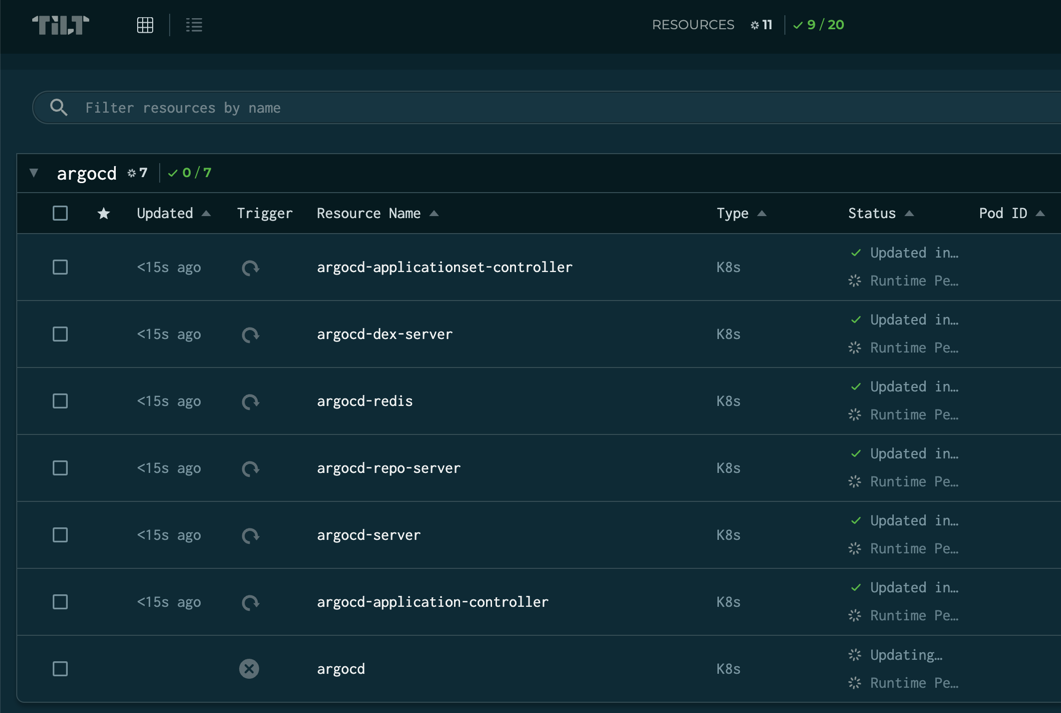
Click the Detailed view button at the top, and click the refresh button next to the Tiltfile resource to run another cycle.

Minikube
If you're using minikube with Tilt we recommend following this guide to setup a local registry that Tilt can push to automatically. Without this Tilt will attempt to push up to Docker Hub by default.
Code Changes
We use a Makefile to simplify our CI/CD process with kubechecks. This makes it easy to test changes locally before pushing them up to ensure your PR will pass all required checks.
Run all CI checks:
This will run code formatting checks, golangci-lint (includes go vet), and all tests.Run individual checks:
make test      # Run all tests
make lint      # Run golangci-lint (includes go vet)
make fmt       # Check code formatting
make validate  # Run go vet (also included in lint)
You can also run tests directly with go test ./.... Please ensure that make ci is passing before opening a PR.
For more build commands, run make help to see all available targets.
Local docker maintenance
The use of docker buildx may lead to a large number of dangling images and build cache being stored locally. You can clean these up with the following commands:
Documentation Changes
We use mkdocs to build our docs locally. You can build these docs by running mkdocs serve from the root of the repository. It will also auto reload when any file is changed in that directory. By default you can view the docs under http://localhost:8000. Please confirm that any changes to documentation render correctly and that your changes display as expected.